GtkListView
GTK 4 introduces a modern set of list widgets:
- GtkListView
- GtkGridView
- GtkColumnView
For an official introduction, see the GTK API Reference — List Widget Overview.
Prior to these widgets, lists and tables were typically built using GtkTreeView, carried over from GTK 3. In a GTK Development Blog article, Matthias Clasen discusses why GtkListView was developed as a modern replacement for GtkTreeView, which has been deprecated since version 4.10.
Sections 32 through 36 cover GtkListView, GtkGridView, GtkColumnView, and their associated objects.
Outline
A list is a sequential data structure. For example, the ordered sequence of strings “one”, “two”, “three”, and “four” forms a list. Each element is called an item. Like an array, a list is an ordered collection where each item can be accessed by its index (0th, 1st, …, n-th).
GIO provides the GListModel interface. It represents a zero-based list whose items all share the same GObject base type or implement the same interface. Because an object implementing GListModel is strictly a data model rather than a widget, it cannot be rendered on the screen on its own. To display the data, GTK 4 provides the GtkListView widget. The data items in the model must be connected to GtkListItem objects inside GtkListView. A GtkListItemFactory creates and connects a GtkListItem for each data item in the list.
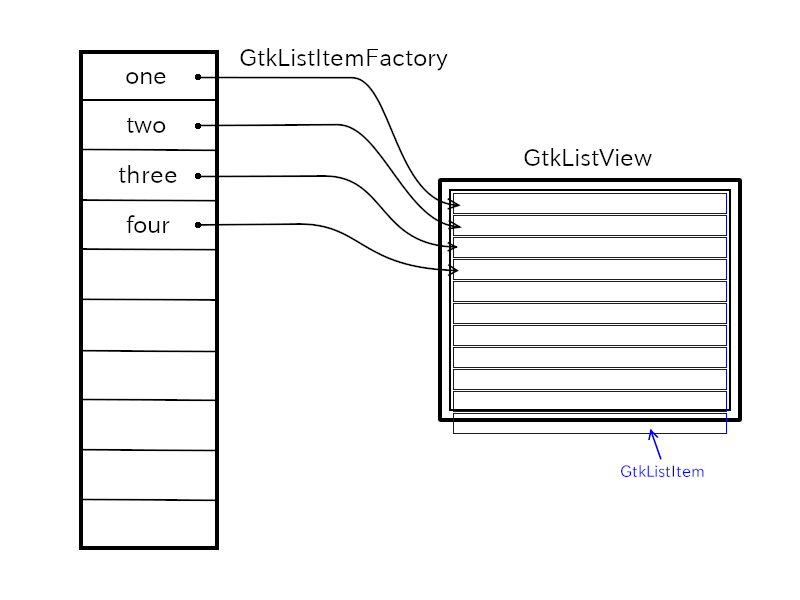
GListModel and GtkStringList
If you want to create a list of strings such as “one”, “two”, “three”, and “four”, keep in mind that you cannot put plain strings directly into a GListModel. This is because GListModel only holds GObject instances (either the base GObject class or any class derived from it), and plain C strings are not GObjects. GtkStringList solves this problem. It implements GListModel and holds GtkStringObject instances to wrap each string GtkStringObject is derived from GObject.
char *array[] = {"one", "two", "three", "four", NULL};
GtkStringList *stringlist = gtk_string_list_new ((const char * const *) array);
In this snippet, the function
gtk_string_list_new() creates a GtkStringList
containing four GtkStringObject instances that wrap “one”,
“two”, “three”, and “four”. You can modify and read the list
using functions such as:
gtk_string_list_append(): Appends a string to the end of the list.gtk_string_list_remove(): Removes an item at a given position.gtk_string_list_get_string(): Retrieves the string at a given position.
For more details, see the GTK 4 API Reference – GtkStringList.
We will cover other list models later in this tutorial.
GtkSelectionModel
GtkSelectionModel is an interface that handles item selection, allowing users to select items by clicking on them. It is implemented by three classes:
- GtkSingleSelection: allows selecting only one item at a time.
- GtkMultiSelection: allows selecting multiple items (e.g., using Ctrl or Shift while clicking).
- GtkNoSelection: disables selection entirely.
These classes are usually placed between a GtkListView and a GListModel. How to connect them will be shown later.
GtkListView
GtkListView is a widget that displays items from a GListModel. Internally, GtkListView uses GtkListItem objects to represent each item from the list model. However, GtkListItem itself is not a widget (it does not inherit from GtkWidget). Therefore, you cannot display it directly on the screen. Instead, you need to set an actual widget — such as a GtkLabel — as the child of the GtkListItem.
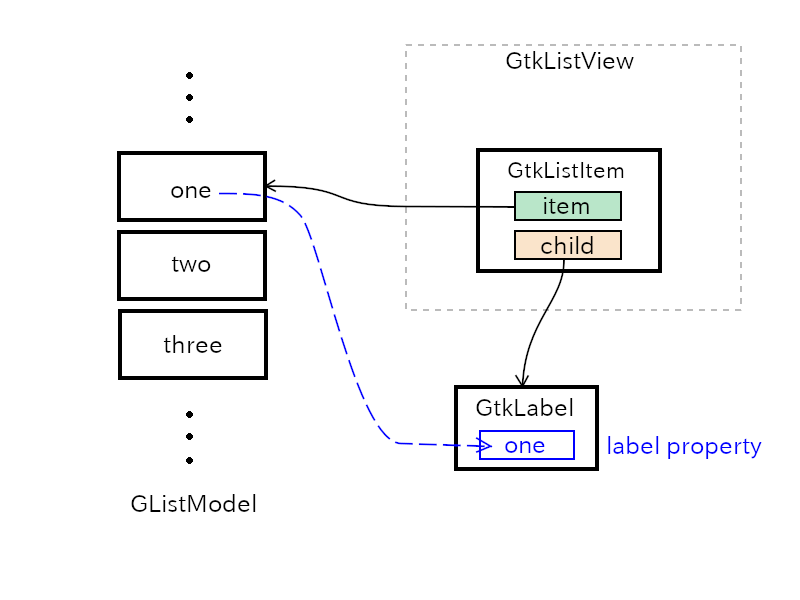
As shown in the diagram above:
- The “item” property of GtkListItem points to the object in the GListModel. For example, the object is a GtkStringObject containing “one”.
- The “child” property holds the widget (such as GtkLabel) used for display.
- This connection allows GtkListView to display the item on the screen.
When a list contains a very large number of items — such as thousands or even millions — creating a widget for every single item would consume too much memory. To solve this, GtkListView recycles GtkListItem instances. Only enough items are created to fill the visible area (usually fewer than 200). As the user scrolls, off-screen GtkListItem objects are reused and rebound to newly visible items from the model. This recycling mechanism keeps memory consumption very low, allowing GtkListView to smoothly handle lists with millions of items.
GtkListItemFactory
GtkListItemFactory is responsible for creating, recycling, and binding GtkListItem objects to the items in a list model. GTK provides two subclasses of this factory:
- GtkSignalListItemFactory: uses C callback functions to set up and bind list items.
- GtkBuilderListItemFactory: uses UI definition files (XML) to build and bind list items.
GtkSignalListItemFactory
GtkSignalListItemFactory provides signals to configure a GtkListItem. There are four signals:
- setup: Emitted to set up a newly created GtkListItem. The settings made here are kept throughout the entire life of the GtkListItem instance. Mainly, the “setup” handler creates a widget (such as a GtkLabel) to display an item, and sets it as the child of the GtkListItem.
- bind: Emitted when an item in the list model is about to be displayed on the screen. The handler binds this item to the widget created in the setup step. Usually, it retrieves the item from the “item” property of the GtkListItem and updates the widget’s display (for example, setting the text of a GtkLabel).
- unbind: Emitted when the GtkListItem is no
longer used for its current item (for example, when it scrolls
out of view). The handler must undo everything done in the bind
step. In simple cases, such as just setting text on a GtkLabel,
you don’t need to do anything here. (See the code snippet of
list1.cbelow.) - teardown: Emitted right before the
GtkListItem is permanently destroyed. The handler must undo
everything done in the setup step. However, when GTK destroys
the GtkListItem, it also destroys its child widget. So in simple
cases, you don’t need to do anything here. (See
list1.c.) After this, the GtkListItem instance will not be used again.
The following program, list1.c, displays the
list of strings: “one”, “two”, “three”, and “four”. Because it
uses GtkNoSelection, items cannot be selected.
#include <gtk/gtk.h>

static void
setup_cb (GtkSignalListItemFactory *self, GObject *object, gpointer user_data) {
  GtkListItem *listitem = GTK_LIST_ITEM (object);
  GtkWidget *lb = gtk_label_new (NULL);
  gtk_list_item_set_child (listitem, lb);
  /* Because gtk_list_item_set_child sunk the floating reference of lb, releasing (unref) isn't necessary for lb. */
}

static void
bind_cb (GtkSignalListItemFactory *self, GObject *object, gpointer user_data) {
  GtkListItem *listitem = GTK_LIST_ITEM (object);
  GtkWidget *lb = gtk_list_item_get_child (listitem);
  /* Strobj is owned by the instance. Caller mustn't change or destroy it. */
  GtkStringObject *strobj = GTK_STRING_OBJECT (gtk_list_item_get_item (listitem));
  /* The string returned by gtk_string_object_get_string is owned by the instance. */
  gtk_label_set_text (GTK_LABEL (lb), gtk_string_object_get_string (strobj));
}

static void
unbind_cb (GtkSignalListItemFactory *self, GObject *object, gpointer user_data) {
  /* There's nothing to do here. */
}

static void
teardown_cb (GtkSignalListItemFactory *self, GObject *object, gpointer user_data) {
  /* There's nothing to do here. */
  /* GtkListItem instance will be destroyed soon. You don't need to set the child to NULL. */
}

static void
app_activate (GApplication *application) {
  GtkApplication *app = GTK_APPLICATION (application);
  GtkWidget *win = gtk_application_window_new (app);
  gtk_window_set_default_size (GTK_WINDOW (win), 600, 400);
  GtkWidget *scr = gtk_scrolled_window_new ();
  gtk_window_set_child (GTK_WINDOW (win), scr);

  const char * const array[] = {
    "one", "two", "three", "four", NULL
  };
  /* sl is owned by ns */
  /* ns and factory are owned by lv. */
  /* Therefore, you don't need to care about their destruction. */
  GtkStringList *sl =  gtk_string_list_new (array);
  GtkNoSelection *ns =  gtk_no_selection_new (G_LIST_MODEL (sl));

  GtkListItemFactory *factory = gtk_signal_list_item_factory_new ();
  g_signal_connect (factory, "setup", G_CALLBACK (setup_cb), NULL);
  g_signal_connect (factory, "bind", G_CALLBACK (bind_cb), NULL);
  /* The following two lines can be left out. The handlers do nothing. */
  g_signal_connect (factory, "unbind", G_CALLBACK (unbind_cb), NULL);
  g_signal_connect (factory, "teardown", G_CALLBACK (teardown_cb), NULL);

  GtkWidget *lv = gtk_list_view_new (GTK_SELECTION_MODEL (ns), factory);
  gtk_scrolled_window_set_child (GTK_SCROLLED_WINDOW (scr), lv);
  gtk_window_present (GTK_WINDOW (win));
}

/* ----- main ----- */
#define APPLICATION_ID "com.github.ToshioCP.list1"

int
main (int argc, char **argv) {
  GtkApplication *app;
  int stat;

  app = gtk_application_new (APPLICATION_ID, G_APPLICATION_DEFAULT_FLAGS);

  g_signal_connect (app, "activate", G_CALLBACK (app_activate), NULL);

  stat = g_application_run (G_APPLICATION (app), argc, argv);
  g_object_unref (app);
  return stat;
}
The file list1.c is located in the src/misc
directory.
Change to the directory containing list1.c and
run:
$ bash comp list1
$ ./a.out
The following window will appear.
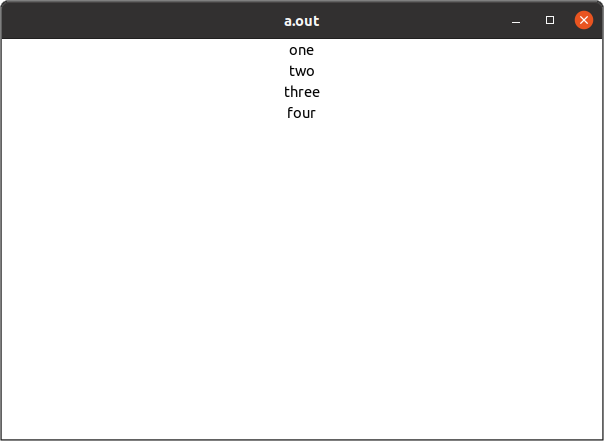
The program is fairly straightforward. If anything is unclear, review this section — especially the GtkSignalListItemFactory subsection.
GtkBuilderListItemFactory
GtkBuilderListItemFactory is another GtkListItemFactory. Its behavior is defined in a UI file.
<interface>
  <template class="GtkListItem">
    <property name="child">
      <object class="GtkLabel">
        <binding name="label">
          <lookup name="string" type="GtkStringObject">
            <lookup name="item">GtkListItem</lookup>
          </lookup>
        </binding>
      </object>
    </property>
  </template>
</interface>
The <template> tag is used to define a
GtkListItem, and its “child” property is set to a
GtkLabel object. The factory reads this template,
creates a GtkLabel instance, and sets it as the “child” property
of the GtkListItem. This is the same as what the
setup handler of
GtkSignalListItemFactory did.
Next, the <binding> tag binds the “label”
property of the GtkLabel to the string property of
a GtkStringObject. The GtkStringObject is obtained from the
“item” property of the GtkListItem (this corresponds to what the
bind handler did). So, the data flow of the
<lookup> tags is like this:
label <- string <- GtkStringObject <- item <- GtkListItemThe inner <lookup> tag has the content
GtkListItem. Usually, a C type name like
GtkListItem doesn’t appear as the content of a tag.
This is a special case. There is an explanation in the GTK
Development Blog by Matthias Clasen:
Remember that the classname (GtkListItem) in a ui template is used as the “this” pointer referring to the object that is being instantiated.
Therefore, the GtkListItem instance is used as the “this”
object of the <lookup> tag when it is
evaluated. The this object will be explained in Section 34.
The C source code is as follows. Its name is
list2.c, and it is located in the /src/misc
directory.
#include <gtk/gtk.h>
#include <string.h>

static void
app_activate (GApplication *application) {
  GtkApplication *app = GTK_APPLICATION (application);
  GtkWindow *win = gtk_application_get_active_window (app);

  if (win == NULL) {
    win = GTK_WINDOW (gtk_application_window_new (app));
    gtk_window_set_default_size (win, 600, 400);
    GtkWidget *scr = gtk_scrolled_window_new ();
    gtk_window_set_child (win, scr);

    const char * const array[] = {
      "one", "two", "three", "four", NULL
    };
    GtkStringList *sl = gtk_string_list_new (array);
    GtkSingleSelection *ss = gtk_single_selection_new (G_LIST_MODEL (sl));

    const char *ui_string =
      "<interface>"
        "<template class=\"GtkListItem\">"
          "<property name=\"child\">"
            "<object class=\"GtkLabel\">"
              "<binding name=\"label\">"
                "<lookup name=\"string\" type=\"GtkStringObject\">"
                  "<lookup name=\"item\">GtkListItem</lookup>"
                "</lookup>"
              "</binding>"
            "</object>"
          "</property>"
        "</template>"
      "</interface>"
      ;

    GBytes *gbytes = g_bytes_new_static (ui_string, strlen (ui_string));
    GtkListItemFactory *factory = gtk_builder_list_item_factory_new_from_bytes (NULL, gbytes);
    g_bytes_unref (gbytes);

    GtkWidget *lv = gtk_list_view_new (GTK_SELECTION_MODEL (ss), factory);
    gtk_scrolled_window_set_child (GTK_SCROLLED_WINDOW (scr), lv);
  }

  gtk_window_present (win);
}

/* ----- main ----- */
#define APPLICATION_ID "com.github.ToshioCP.list2"

int
main (int argc, char **argv) {
  GtkApplication *app;
  int stat;

  app = gtk_application_new (APPLICATION_ID, G_APPLICATION_DEFAULT_FLAGS);

  g_signal_connect (app, "activate", G_CALLBACK (app_activate), NULL);

  stat = g_application_run (G_APPLICATION (app), argc, argv);
  g_object_unref (app);
  return stat;
}
No signal handlers are needed for GtkBuilderListItemFactory. GtkSingleSelection is used, so the user can select one item at a time.
Because this is a small program, the UI data is given as a string.
GtkDirectoryList
GtkDirectoryList
GtkDirectoryList is a list model containing GFileInfo
objects, which hold information about files in a certain
directory. It uses
g_file_enumerate_children_async() to get the
GFileInfo objects. The list model is created by the
gtk_directory_list_new() function.
GtkDirectoryList *gtk_directory_list_new (const char *attributes, GFile *file);attributes is a comma-separated list of file
attributes. File attributes are key-value pairs. A key consists
of a namespace and a name. For example, the “standard::name” key
represents the name of a file. “standard” means general file
information, and “name” means the filename. The following table
shows some examples.
| key | meaning |
|---|---|
| standard::type | file type (for example, regular file, directory, symbolic link, etc.) |
| standard::name | filename |
| standard::size | file size in bytes |
| access::can-read | read privilege (whether the user is able to read the file) |
| time::modified | the time the file was last modified in seconds since the UNIX epoch |
The current directory is “.”. The following code creates a
GtkDirectoryList dl, and its contents are GFileInfo
objects for the files under the current directory.
GFile *file = g_file_new_for_path (".");
GtkDirectoryList *dl = gtk_directory_list_new ("standard::name", file);
g_object_unref (file);
It is not so difficult to make a file listing program by
changing list2.c from the previous subsection. One
problem is that GFileInfo doesn’t have properties. A
<lookup> tag looks for a property, so it
cannot be used for getting a filename from a GFileInfo object.
Instead, a <closure> tag is appropriate in
this case. A <closure> tag specifies a
function and the type of its return value.
char *
get_file_name (GtkListItem *item, GFileInfo *info) {
  const char *filename_bin;

  if (G_IS_FILE_INFO (info) && (filename_bin = g_file_info_get_name (info)) ) {
    return g_filename_display_name (filename_bin);
  } else {
    return g_strdup ("");
  }
}
... ...
... ...

"<interface>"
  "<template class=\"GtkListItem\">"
    "<property name=\"child\">"
      "<object class=\"GtkLabel\">"
        "<binding name=\"label\">"
          "<closure type=\"gchararray\" function=\"get_file_name\">"
            "<lookup name=\"item\">GtkListItem</lookup>"
          "</closure>"
        "</binding>"
      "</object>"
    "</property>"
  "</template>"
"</interface>"- The string “gchararray” is a type name registered in the
GObject type system. While the type “gchar” is the same as the C
chartype, “gchararray” specifically represents a NULL-terminated string (char *). In GtkBuilder XML files, you must use these registered type names instead of native C types to let the GValue system handle the data correctly. For example, common type names includegboolean,gchar,gint,gfloat,gdouble, andgchararray. See the GObject tutorial for further information. - The
<closure>tag has atypeattribute and afunctionattribute. Thefunctionattribute specifies the function name, and thetypeattribute specifies the type of the return value of the function. The content of the<closure>tag (between<closure...>and</closure>) consists of the parameters for the function.<lookup name="item">GtkListItem</lookup>returns the value of theitemproperty of theGtkListItem. This will be the second argument of the function. The first parameter is always theGtkListIteminstance, which is thethisobject. Thethisobject is explained in Section 34. - The
get_file_namefunction is the callback function for the<closure>tag. It first checks theinfoparameter because it can beNULLwhen the GtkListItem instance is not bound to an item in the GListModel. Ifinfois a GFileInfo instance, it retrieves the filename and assigns it to thefilename_binvariable. Iffilename_binis also non-NULL, it is converted to a UTF-8 string and returned. Otherwise, theget_file_namefunction returns a newly allocated empty string (or: a duplicated empty string). Finally, the<binding name="label">tag binds the “label” property of the GtkLabel object to the value produced by the<closure>tag. When the binding is established, GTK automatically monitors the expression and updates the “label” property of the GtkLabel whenever the underlying item or its data changes, keeping the view and the data synchronized.
The whole program (list3.c) is as follows. The
program is located in /src/misc
directory.
#include <gtk/gtk.h>
#include <string.h>

char *
get_file_name (GtkListItem *item, GFileInfo *info) {
  const char *filename_bin;

  if (G_IS_FILE_INFO (info) && (filename_bin = g_file_info_get_name (info)) ) {
    return g_filename_display_name (filename_bin);
  } else {
    return g_strdup ("");
  }
}

static void
app_activate (GApplication *application) {
  GtkApplication *app = GTK_APPLICATION (application);
  GtkWidget *win = gtk_application_window_new (app);
  gtk_window_set_default_size (GTK_WINDOW (win), 600, 400);
  GtkWidget *scr = gtk_scrolled_window_new ();
  gtk_window_set_child (GTK_WINDOW (win), scr);

  GFile *file = g_file_new_for_path (".");
  GtkDirectoryList *dl = gtk_directory_list_new ("standard::name", file);
  g_object_unref (file);
  GtkNoSelection *ns = gtk_no_selection_new (G_LIST_MODEL (dl));

  const char *ui_string =
    "<interface>"
      "<template class=\"GtkListItem\">"
        "<property name=\"child\">"
          "<object class=\"GtkLabel\">"
            "<binding name=\"label\">"
              "<closure type=\"gchararray\" function=\"get_file_name\">"
                "<lookup name=\"item\">GtkListItem</lookup>"
              "</closure>"
            "</binding>"
          "</object>"
        "</property>"
      "</template>"
    "</interface>"
    ;

  GBytes *gbytes = g_bytes_new_static (ui_string, strlen (ui_string));
  GtkListItemFactory *factory = gtk_builder_list_item_factory_new_from_bytes (NULL, gbytes);
  g_bytes_unref (gbytes);

  GtkWidget *lv = gtk_list_view_new (GTK_SELECTION_MODEL (ns), factory);
  gtk_scrolled_window_set_child (GTK_SCROLLED_WINDOW (scr), lv);
  gtk_window_present (GTK_WINDOW (win));
}

/* ----- main ----- */
#define APPLICATION_ID "com.github.ToshioCP.list3"

int
main (int argc, char **argv) {
  GtkApplication *app;
  int stat;

  app = gtk_application_new (APPLICATION_ID, G_APPLICATION_DEFAULT_FLAGS);

  g_signal_connect (app, "activate", G_CALLBACK (app_activate), NULL);

  stat = g_application_run (G_APPLICATION (app), argc, argv);
  g_object_unref (app);
  return stat;
}
The UI data (the XML data above) is used to build the
GtkListItem template at runtime. GtkBuilder refers to the symbol
table to find the get_file_name function.
Generally, a symbol table is used by a linker to link object
files into an executable file. It includes function names and
their locations. A linker usually doesn’t include the full
symbol table in the final executable file. However, if the
--export-dynamic option is given, the linker
includes all symbols in the dynamic symbol table of the
executable file.
To achieve this, the -Wl,--export-dynamic option
is passed to the C compiler.
-Wlis a C compiler option that passes the following option to the linker.--export-dynamicis a linker option. The following description is quoted from the linker documentation:
“When creating a dynamically linked executable, add all symbols to the dynamic symbol table. The dynamic symbol table is the set of symbols which are visible from dynamic objects at run time.”
Compile and execute it.
$ gcc -Wl,--export-dynamic `pkg-config --cflags gtk4` list3.c `pkg-config --libs gtk4`You can also create a shell script to compile
list3.c.
gcc -Wl,--export-dynamic `pkg-config --cflags gtk4` $1.c `pkg-config --libs gtk4`Save this one-liner to a file named comp under
the current directory.
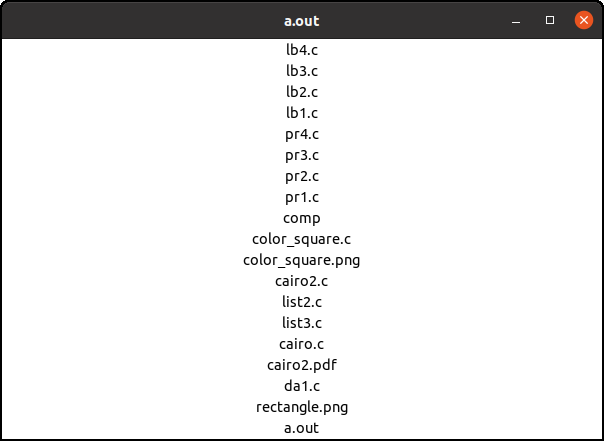
You can compile list3.c and execute it, like
this:
$ bash comp list3
$ ./a.out