GtkFontDialogButton and CSS Updates
The Preference Dialog
When you click “Preferences” menu on the new TFE application, the following preference dialog appears.
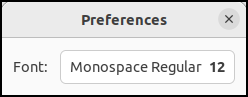
A preference dialog allows users to customize settings, such as fonts. Nowadays, it is often called a “Settings” dialog.
This dialog contains only one bUtton: a
GtkFontDialogButton. You can add more widgets to
this dialog, but this simple layout is enough for our first
version.
Clicking this button opens GtkFontDialog to
select a font.
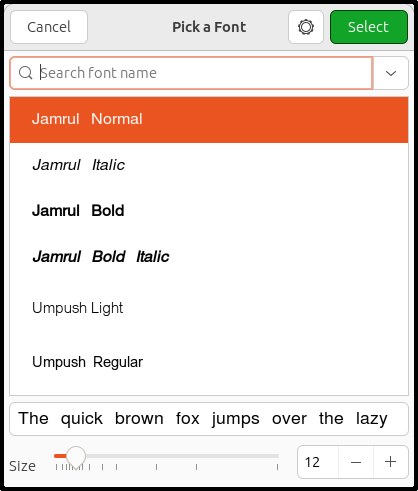
When the user selects a font and clicks the “Select” button, the application’s font updates.
Note that GtkFontDialogButton and
GtkFontDialog are new widgets introduced in GTK
4.10. They replace the older GtkFontButton and
GtkFontChooserDialog, which were deprecated in
version 4.10.
The Composite Widget
This preference dialog contains a GtkBox, a
GtkLabel, and a GtkFontDialogButton,
and is defined as a composite widget. Here is the template UI
file for TfePref:
<?xml version="1.0" encoding="UTF-8"?>
<interface>
  <template class="TfePref" parent="GtkWindow">
    <property name="title">Preferences</property>
    <property name="resizable">FALSE</property>
    <property name="modal">TRUE</property>
    <child>
      <object class="GtkBox">
        <property name="orientation">horizontal</property>
        <property name="spacing">12</property>
        <property name="halign">center</property>
        <property name="margin-start">12</property>
        <property name="margin-end">12</property>
        <property name="margin-top">12</property>
        <property name="margin-bottom">12</property>
        <child>
          <object class="GtkLabel">
            <property name="label">Font:</property>
            <property name="xalign">1</property>
          </object>
        </child>
        <child>
          <object class="GtkFontDialogButton" id="font_dialog_btn">
            <property name="dialog">
              <object class="GtkFontDialog"/>
            </property>
          </object>
        </child>
      </object>
    </child>
  </template>
</interface>- The
<template>tag specifies that this is a composite widget. - The
classattribute is set to “TfePref” and theparentattribute to GtkWindow. This makesTfePrefa child class of GtkWindow. - It sets three properties:
title,resizable, andmodal. Whenmodalis set toTRUE, the user cannot interact with the parent window while this dialog is open. - Inside, there is a horizontal
GtkBoxcontaining aGtkLabeland aGtkFontDialogButton.
The Header File
The tfepref.h file defines the types and
declares the public function.
#pragma once

#include <gtk/gtk.h>

#define TFE_TYPE_PREF tfe_pref_get_type ()
G_DECLARE_FINAL_TYPE (TfePref, tfe_pref, TFE, PREF, GtkWindow)

GtkWidget *
tfe_pref_new (GtkApplication *application);- 5: Defines the
TFE_TYPE_PREFmacro, which is replaced bytfe_pref_get_type(). - 6: Uses the
G_DECLARE_FINAL_TYPEmacro to automatically generate standard boilerplate code. - 8-9: Declares the public function
tfe_pref_new(), which creates a newTfePrefinstance. It takes a GtkApplication argument, which will be assigned to “application” property.
The C Source File for the Composite Widget
The following code is the tfepref.c file.
#include <gtk/gtk.h>
#include "tfestylemanager.h"
#include "tfepref.h"

struct _TfePref
{
  GtkWindow parent;
  GtkFontDialogButton *font_dialog_btn;
};

G_DEFINE_FINAL_TYPE (TfePref, tfe_pref, GTK_TYPE_WINDOW);

static void
font_dialog_btn_notify_cb (GtkFontDialogButton *btn, GParamSpec *pspec, gpointer user_data) {
  PangoFontDescription *font_desc = gtk_font_dialog_button_get_font_desc (btn);

  tfe_style_manager_set_font (font_desc);
}

static void
tfe_pref_dispose (GObject *gobject) {
  TfePref *pref = TFE_PREF (gobject);

  gtk_widget_dispose_template (GTK_WIDGET (pref), TFE_TYPE_PREF);
  G_OBJECT_CLASS (tfe_pref_parent_class)->dispose (gobject);
}

static void
tfe_pref_init (TfePref *pref) {
  gtk_widget_init_template (GTK_WIDGET (pref));
  g_signal_connect (pref->font_dialog_btn, "notify::font-desc", G_CALLBACK (font_dialog_btn_notify_cb), NULL);
}

static void
tfe_pref_class_init (TfePrefClass *class) {
  G_OBJECT_CLASS (class)->dispose = tfe_pref_dispose;
  gtk_widget_class_set_template_from_resource (GTK_WIDGET_CLASS (class), "/com/github/ToshioCP/tfe11/tfepref.ui");
  gtk_widget_class_bind_template_child (GTK_WIDGET_CLASS (class), TfePref, font_dialog_btn);
}

GtkWidget *
tfe_pref_new (GtkApplication *application) {
  return GTK_WIDGET (g_object_new (TFE_TYPE_PREF, "application", application, NULL));
}- 5-9: The
_TfePrefstructure includes afont_dialog_btnmember. This holds a pointer to theGtkFontDialogButtoninstance defined in the XML file (tfepref.ui). This member name must exactly match theidattribute in the XML. - 11: The
G_DEFINE_FINAL_TYPEmacro expands into standard boilerplate code. - 13-18:
font_dialog_btn_notify_cb()is the notify signal handler for the font dialog button’sfont-descproperty. This signal is emitted whenever the property changes. The handler retrieves thefont-descproperty (which is aPangoFontDescription) and passes it to ourtfe_style_manager_set_font()style manager function. Becausetfe_style_manager_set_font()not only converts this data into a CSS string but also applies it to theGdkDisplay, simply calling this function instantly updates the screen’s style. - 20-26: The dispose handler uses
gtk_widget_dispose_template()to destroy the instance built from the template. - 28-32: The instance initialization function uses
gtk_widget_init_template()to build the instance from the template. It also connects the notify signal for thefont-descproperty to our callback handler. - 34-39:
tfe_pref_class_init()loads the template and binds thefont_dialog_btninstance variable to the UI file. - 41-44: The constructor
tfe_pref_new()creates the new instance usingg_object_new(). The argumentapplicationis assigned to the “application” property.
Handling it in the Application
The preference dialog opens when the user clicks “Preferences” in the application menu. Therefore, we need to add code to generate and display the dialog inside the application’s action handler.
static void
pref_activated (GSimpleAction *action, GVariant *parameter, gpointer user_data) {
  GtkApplication *app = GTK_APPLICATION (user_data);
  GtkWindow *win = gtk_application_get_active_window (app);
  GtkWidget *pref_dialog;

  pref_dialog = tfe_pref_new (app);
  gtk_window_set_transient_for (GTK_WINDOW (pref_dialog), win);
  gtk_window_present (GTK_WINDOW (pref_dialog));
}
The logic here is very simple: it creates the preference dialog, sets the main window as its transient parent window, and shows the dialog. The user closes the dialog by clicking the window’s close (X) button. Once closed, the dialog instance is destroyed.
Compile and Run
The source code is located in the src/tfe11 directory.
Before compiling, you need to make a few changes:
- Change the Application ID in
main.cto “com.github.ToshioCP.tfe11”. - Change the prefix in
tfe.gresource.xmlto “/com/github/ToshioCP/tfe11”. Be sure to update the UI file loading prefix intfewindow.cto match. - Add
tfepref.cto the source files list inmeson.build.
Move your current directory to src/tfe11 and
type the following commands:
$ meson setup _build
$ ninja -C _build
$ _build/tfe
Select “Preferences” from the menu to open the dialog. Click the font button to open the font chooser, pick a font and size, and the chooser will close, returning you to the preference dialog. Now, click the close (X) button at the top right to close the preference dialog. You should see that the text view in the main window is now using your selected font.
This setting remains active while the program is running, but once you exit the application, all settings are lost. The next time you launch the app, it will revert to the default font.
To save these settings so they persist across restarts, the best practice in GTK is to use GSettings. In the next section, we will wrap up the TFE project by covering how to implement GSettings.